

Sophos
Blocking attacks with Sophos security software
Location: New Zealand-wide
Services: Security I Managed Detection and Response (MDR)
We’ll keep this client anonymous, but the case study is very much real. Managed Detection and Response (MDR) is a security team we subscribe to rather than employ. For this particular client, Sophos software runs on every customer laptop and server, reporting back to Sophos analysts 24 hours a day, every day of the year. When something looks like an attack, the analysts investigate and, if needed, act – from isolating a laptop to stopping a program.
These same analysts also receive alerts from three other systems the customer already operates: the Palo Alto firewall that guards internet connection, the Duo app that confirms staff identity when they log in from outside, and Microsoft 365. Joining these up means one team sees the whole picture rather than four teams each seeing a corner of it.
Over the past six months the customer has had no security incidents. Not one event needed the customer to stop, recover data, notify families or call in outside help.
That’s not to say there weren’t attempts. In that same period, Sophos and its analysts worked through more than 46,000 suspicious signals from laptops, servers, firewall and login system. They blocked 39 visits to websites carrying malware, cleaned up 31 unwanted programs, stopped 32 attempts to run malicious code in memory, and watched the firewall turn away every one of the thousands of automated attacks aimed at the customer’s public web services. None of this required action by the customer’s staff.
The 46,591 figure deserves a word. Almost all of it comes from one month. In July an automated attacker scanned the customer’s public web server more than 33,000 times looking for a common weakness. The firewall blocked every attempt, Sophos analysts confirmed nothing got through, and the noise faded by August. That is what a good month looks like from the inside: loud on the graph, quiet for the customer.
Suspicious signals reviewed by Sophos MDR, by month and source
Detections that matched an attacker-behaviour rule were reviewed by analysts. June – August 2026
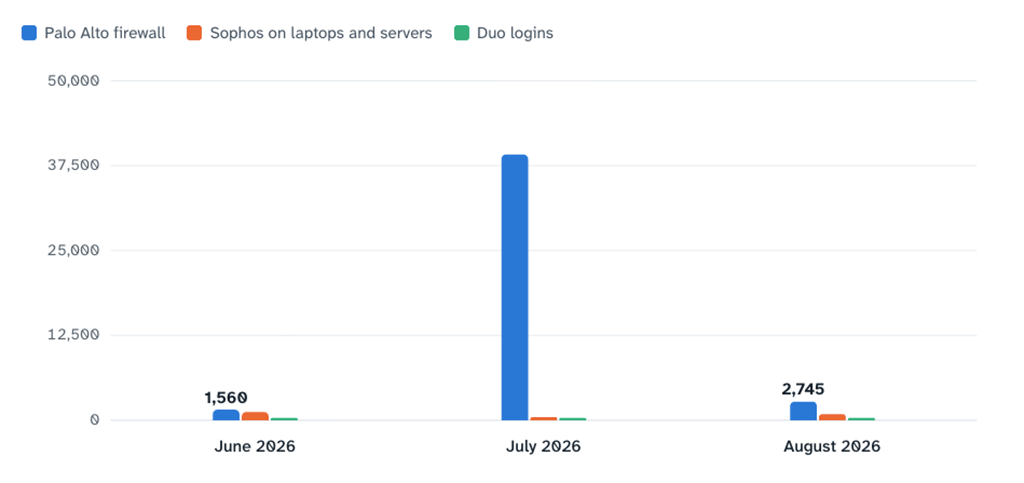
In this environment the firewall blocked, Duo denied, Microsoft flagged, and Sophos analysts saw all of it in one place, so nobody at the customer had to.
Sophos measures its own coverage with an Account Health Score. It checks that every device is protected, that protection cannot be switched off by an intruder, and that policies match Sophos’s own recommendations. The customer has scored 99 or 100 out of 100 at every monthly check.
What is being protected:
- Laptops and desktops: About 310 staff devices, Windows and Mac, across a national network of sites
- Servers: 11 servers running files, email, identity and learning systems
- Internet connection: Palo Alto firewall alerts forwarded to Sophos for review
- Staff logins: Duo multi-factor logins to the customer’s remote access service
- Microsoft 365: Security alerts, audit logs and account response actions
What Sophos watched & stopped before it became an issue
Most attacks on organisations like this start with a person: a link in an email, a search result that leads somewhere bad, a free download that is not what it claims. Sophos sits in the browser and on the device to catch these moments.
Blocking dangerous websites
When a staff member’s browser tried to load a page known to carry malware, Sophos stopped the page before it ran. This happened 39 times on 25 different laptops between late June and mid September. In every case the person simply saw a block page and carried on. Without it, each of those visits was a chance for malware to land on a customer device.
Keeping to appropriate content
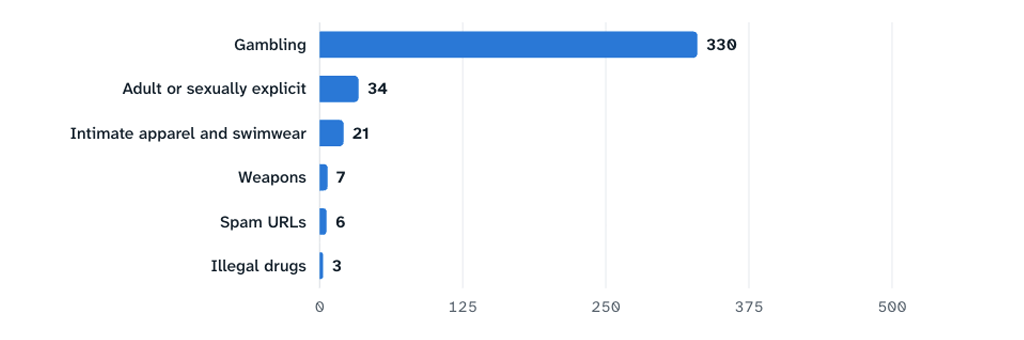
The customer’s web policy blocks categories of site that have no place on a work device. Over the 90 days Sophos applied that policy 401 times across 60 staff devices. Most blocks were gambling-related advertising and Lotto promotional emails loading in the background of otherwise ordinary pages, not staff seeking out those sites. The policy also caught adult content, weapons and drug-related pages. This is the kind of protection an education customer can point to when asked how it meets its duty of care on its own equipment. It is also a line that lands well with any governance audience.
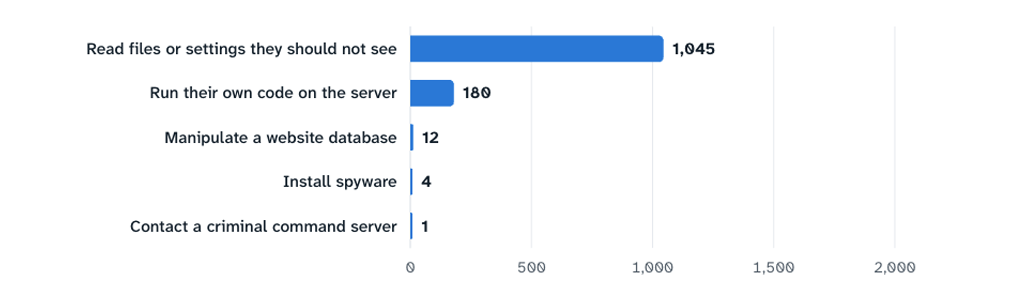
What attackers tried at the firewall, 22 August to 21 September 2026
1,242 blocked attempts, grouped by what the attacker was trying to do.
Removing unwanted programs
Potentially unwanted applications (PUAs) are programs that are not quite viruses but slow devices down, hijack searches or spy on browsing. Sophos found and automatically cleaned 31 in the period. Two patterns account for nearly all of them: a browser search hijacker that kept reinstalling itself on one laptop, and an old “PC clean-up” installer sitting in an archived copy of former staff home drives on the file server. Both are easy to close off for good, and both appear in the action list at the end.
Stopping attacks that never touch the disk
Modern attacks often run entirely in a computer’s memory so that traditional antivirus never sees a file to scan. Sophos’s exploit protection watches for the techniques themselves. It blocked 32 such attempts, in Microsoft Edge, in the Canva app, in Windows command tools and, most often, in a device-management agent on one administrative machine where a legitimate tool behaves in a way that looks like an exploit. Sophos stopped it every time and no device was harmed. This is deliberately conservative protection: the cost of a false alarm is a moment’s interruption; the cost of a missed exploit is a ransomware incident.
Application control: knowing which powerful tools are in use
Some legitimate programs are also favourites of attackers: remote-control tools, scripting engines, tools that reveal who is logged in. The customer’s policy records every use of these on 293 devices, 30,761 uses over 90 days. Almost all of it is expected: Fastcom’s own remote support tool, the VPN client, and Windows’ built-in scripting used by management software. The value is that if an unfamiliar remote-access tool ever appears, it stands out immediately. One did during the period (a single use of a consumer remote-support program), and it was visible the same day.
Peripheral control: knowing what gets plugged in
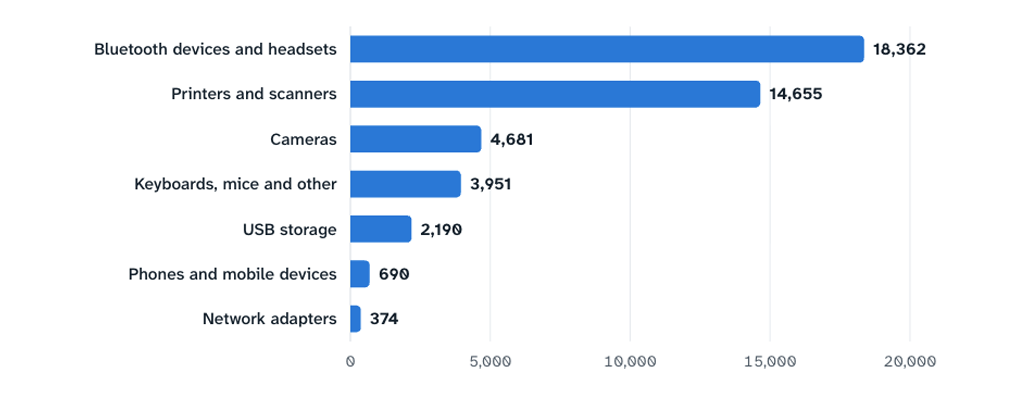
Every USB stick, phone, printer, camera and Bluetooth device connected to a customer computer is recorded. Over 90 days that was 44,903 connections on 251 devices, including 2,165 USB storage devices on 111 laptops. This matters for two reasons: USB drives are a classic way for malware to arrive and for data to leave, and for an organisation handling learner information the ability to answer “What was connected to that laptop, and when?” is part of good governance. Today the policy records rather than restricts, which gives the customer the option to tighten it later with evidence of the impact.
Peripheral devices connected to customer computers, by type
44,903 connections recorded, 23 June to 21 September 2026. All were permitted under the current policy.
Servers and the settings that protect the protection
The eleven servers carry the most sensitive systems, so Sophos holds them to a stricter standard. As at the June quarterly review, all servers had tamper protection on (so an intruder cannot switch Sophos off), every policy matched Sophos’s recommended settings, and there were no risky exclusions. Sophos’s analysts also ran 784 detections on customer devices through review in the last 30 days. Nearly all were ordinary administration that superficially resembles attacker behaviour, such as a login script listing network shares, and none met the bar for escalation. That review is the human part of MDR that no software alone provides.
Watching the front door and the keys
The third leg of the service is joining Sophos to systems the customer already runs, so that one team sees attacks on the network, on logins and on Microsoft 365 alongside what happens on devices.
Palo Alto firewall: the front door
The customer’s internet-facing services, chiefly the public web server and the learning platform, are probed constantly by automated attackers from around the world. In the 30 days to 21 September the firewall reported 1,242 blocked attacks from 179 different sources, on every single day of the month. Almost all were attempts to read configuration files or run code on the web server. The firewall reset every connection, and Sophos analysts reviewed the pattern and confirmed nothing succeeded. July’s spike of more than 33,000 attempts was the same story at higher volume.
Website blocks by policy category, 23 June to 21 September 2026
Attempts to load a page in a blocked category. One series, so the bars share one colour.
Duo: the keys
Staff working remotely prove who they are with Duo, usually by approving a prompt on their phone. In the same 30 days Duo denied 214 login attempts across 73 staff accounts. All came from within New Zealand and the great majority were prompts that simply went unanswered, with a handful of wrong codes, cancelled prompts and temporary lock-outs. None showed the pattern of a stolen password being tried against a real account. Sophos receives every one of these so that if an attacker does obtain a staff password and starts bombarding a staff member with approval requests, analysts see it as it happens rather than after the fact.
Microsoft 365: the office
Three Microsoft feeds are connected and healthy: security alerts, audit logs, and the ability for Sophos to act on a compromised account. During June it contributed one detection, a staff member clicking a link Microsoft later judged malicious, which Sophos reviewed alongside the device data and closed without escalation. This is exactly the join-up MDR is for: the click seen by Microsoft, the browser and device seen by Sophos, one analyst looking at both.
Gaps flagged for action with the client
Sophos MDR does more than block and report – it also shows where the gaps are. It identified several opportunities to strengthen the client’s security, based on its reviews and 90 days of monitoring data. These include bringing 14 MacBooks fully under protection, investigating recurring Sophos service restarts on one server, reviewing brief protection switch-offs, removing an archived file triggering repeat alerts, preventing a browser hijacker from returning, and completing integration and configuration housekeeping. The data also gives the client a clear basis for deciding whether to move application and peripheral controls from monitoring to actively blocking unauthorised tools. Each item has an agreed action and owner, giving Fastcom and the client a practical, shared roadmap for closing security gaps.
Ready to find a better way?
Let’s have a conversation about how Fastcom can help your business thrive. No pressure, just good advice from a team that’s been doing this since 2009.